A schedule that shows what it costs.
Scheduling is where restaurants win or lose their margin. Fresh shows the cost of every shift as you plan it, so you see the week’s labor before it happens.
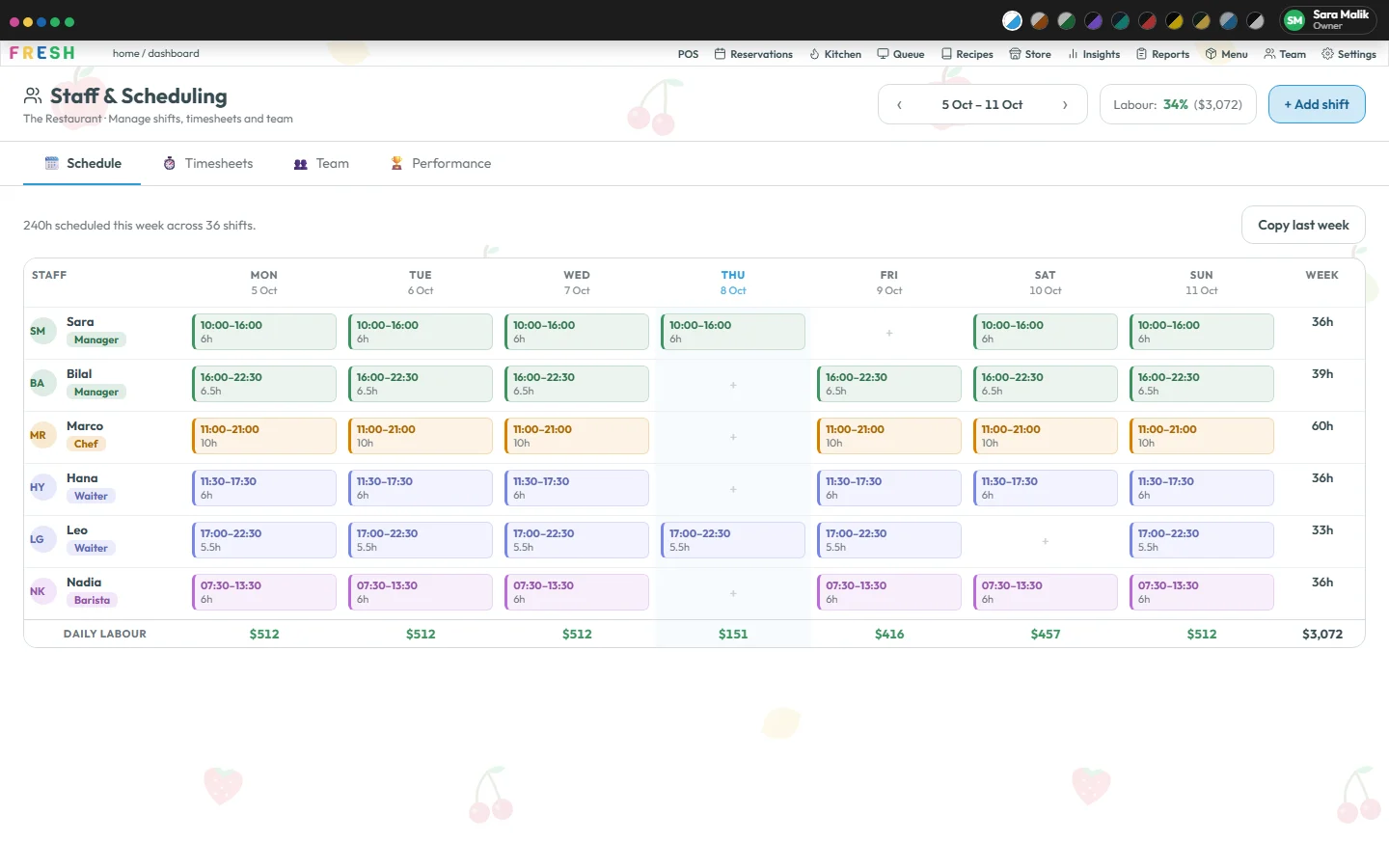
Plan the week
Build the schedule by person and day. A shift’s date and times are simple text, and a shift that ends at or before its start runs past midnight, so the late kitchen shift just works. Roles, the first day of the week and your labor limits are settings.
Hours, overtime and pay, worked out on the server
Hours worked, overtime, pay and labor % come from the shifts and the clock-in records, calculated on the server rather than added up on a screen. The overtime multiple is a setting for your rules.
Clock in and timesheets
Staff clock in and out, and the hours worked, overtime and pay are worked out from those records.
Performance
A performance view ranks the people who created completed orders, worked out from the same orders as every other figure. It reports what the system really records and nothing it cannot know.
Roles and permissions
Owner, manager, chef and waiter each see only the screens you allow, and per section they can view, add, update or delete. Nobody can grant access they do not have themselves.
Questions
Can a shift run past midnight?
Yes. A shift that ends at or before its start is treated as running into the next day.
Does Fresh work out labor percentage?
Yes, on the server, from the schedule and timesheets against sales. For how to read it, see our labor cost guide.